Contents
Choosing a Font
Emailing Requested Pages
Formatting your Manuscript
Keeping Punctuation Consistent
Receiving an Offer of Representation
Choosing a Font
The choice of font for your manuscript is one that’s been made for you. You need to use 12 pt. Times New Roman, double-spaced.
The size 12 font and double spacing is non-negotiable. The typeface is. Still, after asking dozens of literary agents about their preferences, I urge you to choose Times New Roman.
Why TNR?
Personally, as a typesetter, reader, and graphic designer, I loathe Times New Roman. But here’s why you should use Times New Roman for standard manuscript formatting:
- I polled 20 agents, and all of them accept TNR. Not so with other fonts.
- It’s standard. It’s been the standard since TNR was the default typeface installed on home computers.
- It’s a serif font. Publishers prefer serif fonts, and that preference has carried over to literary agents. It’s what we associate with books.
- It’s available on any device or browser. There are only two serif typefaces available on any browser or device: Times New Roman and Georgia. If you use any other font, there’s a definite chance that your recipient’s device won’t have the font and will switch it to TNR. You might think “Well, that’s fine. It switches for them.” But every time I get a manuscript in Cambria (the current default typeface for Word), I get a little pop-up that says “An Error Occurred” that I have to acknowledge and close. Yes, most agents will have Cambria on their computers, but Mac users might not, and it’s still not considered a web-safe font.
- TNR is very easy to read or change on e-reading devices. Many agents now read requested partials and fulls on Kindles or tablets. Times New Roman is easily changed into the typeface and size of their preference.
Courier has been a standard since the days of snail-mail manuscript mailing because, as a monospaced font, it yields approximately the same number of words per page. It has serifs (though it’s technically a slab serif), and it’s available on any device or browser. I prefer Courier while editing because it gives the most white space. My eyes are used to it, and it feels natural. I also know that I’m in “editing mode” whenever I’m reading Courier. However, some agents passionately hate Courier. They aren’t going to reject you because of your font, but they will switch it to something else, likely Times. Courier is also not easy to read on e-readers.
Bottom line:
Write in whatever font you darn well please. You could type in Webdings if it will help you from revising while getting out your first draft. Revise in something legible: a serif, a monospaced slab (like Courier), even a sans-serif (like Arial). Before you submit to agents, revise one last time in a typeface from a different family—you’ll be surprised how many things you catch when the words aren’t always in the same position on the page! Submit to agents using 12 pt TNR, double-spaced, unless they’ve stated differently in their agency guidelines.
Pasting Pages in the Body of the Email
Word uses a bunch of formatting that doesn’t always translate to web use, like italics, non-breaking spaces, space after paragraphs, double-spaced lines, and centered text. It’s always a good idea to strip the formatting for blog posts or emails, either by putting it into a text-only program like Notepad or TextEdit or by choosing “use destination formatting” while pasting. I hold down shift while pasting: shift+control+V
My pages will have a consistent look with my query letter, rather than be in a different font or format. Then I make sure there are spaces between my paragraphs, so it doesn’t look like one huge blob of text.
I’ve received pasted pages that weren’t stripped of formatting. Sometimes the spaces between words are gone. Sometimes the text is in one single horizontal line that scrolls on to the right, forever. Sometimes the query is gigantic or microscopic in comparison to the pages. Make it easy on the agent to read your pages. Don’t give him or her an easy way to say no.
Emailing Requested Pages
Subject Line
If you are emailing requested pages to an agent—that is, an agent asked you to send him or her pages after you queried—your subject line should be obvious that you are replying with requested materials.
A subject of Partial Request: BOOK TITLE Age Category Genre is a good starting point.
I’d reply to the email that they sent. An agent might mark your initial query email as important, reply directly to that (re: Query: CYCLES MG Fantasy) with a request for pages, and then if you reply to their email (re: Query: CYCLES MG Fantasy), your new email, because it’s part of the same thread, will also be marked as important.
However, if you’re replying to something they rejected, then your reply will also be marked as rejected. Resist the urge to send a “thank you” or “what about this other manuscript?” reply. If rejected, you can query with another manuscript in 6+ months. If you got a revise and resubmit, resubmit in 6+ weeks.
Content
Be professional, polite, and concise.
Dear Mr. Agent,
I am delighted to send you these pages you requested. Below I have included my initial query letter.
I look forward to hearing back from you.
Sincerely,
Your Name
[Initial query letter—the same one sent to this specific agent—pasted without formatting]
Make sure you are following agency guidelines. Don’t attach pages if they want them pasted in the body of the email. If they request your query or a synopsis as separate files, follow their instructions!
Naming your Document
When sending a partial or full request to an agent, name your document Surname_TITLE_Partial or Surname_TITLE_Full (including the .doc extension). That way, if an agent saves your document to her computer or e-reader, she will immediately know 1) what and whose it is before she opens it, 2) the query that got her interested, and 3) where to send her response if she lost your initial e-mail.
Formatting your Manuscript
Start out with 1-inch margins all around and left (not justified) alignment.
Page i—The Query Letter
Paragraph Style: “Title Page”—12 pt TNR, single-spaced, no indent
Because many agents read requested pages on e-readers, they may have forgotten your query when they start reading your pages. I recommend including your query in the body of the email (see above) as well as before the title page of your requested pages.
Use 12 pt. Times New Roman, single-spaced with an extra space between paragraphs (like your email query). Make sure you are sending the same query you sent the agent originally. Don’t send a partial to Ms. Sally Agent with a query to Mr. Hans Agent, listing the specific reasons why you want him as your agent!
Then insert a page break.

Page ii—The Title Page
This page should be in the same paragraph style, with no headers.
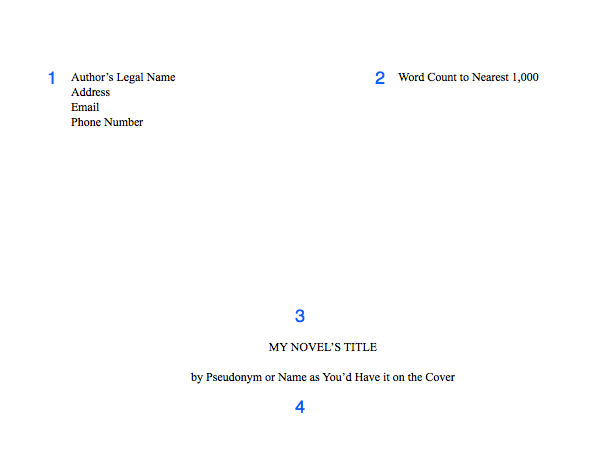
1. Include your contact information, especially your email and a reliable phone number. Agents offer representation over the phone! But they will email you to let you know if they’d like to call you, so you can schedule a time.
2. After you type your name, add a tab stop with a right alignment to your ruler on the right margin. Then enter your word count, rounded to the nearest 1,000. If text keeps dropping to the next line, make the tab option a decimal alignment.
3. Halfway down the page, include your title in all-caps. Keep it in 12 pt. font, and do not bold, italicize, or underline it.
4. Two lines down (or one line, if you double-space this part), include your name as you’d like it to appear on your cover. Note that if your legal name is Steven King, you will probably need a pseudonym to avoid confusion with the famous SK.
Then insert a section break.
Your Manuscript
Page one of your manuscript and following pages will have the same formatting.
Be sure to include your header in the header section, not in the body of the page.
5. Headers should include your surname (whichever surname you have been using in your correspondence with the agent), an abbreviation of your title (if it’s longer than 3 words), and the page number (insert the page number). The page number will automatically show as 2 or 3. In your section settings, change the page numbering to start at 1. Learn how for Word. In Pages, in your inspector window, chose Layout > Section > Start at 1.
I prefer headers to be aligned on the right side so my eyes don’t have to skip over them every time I scroll down or flip to the next page.
Paragraph Style: “Header”—10 or 12 pt. TNR, right aligned
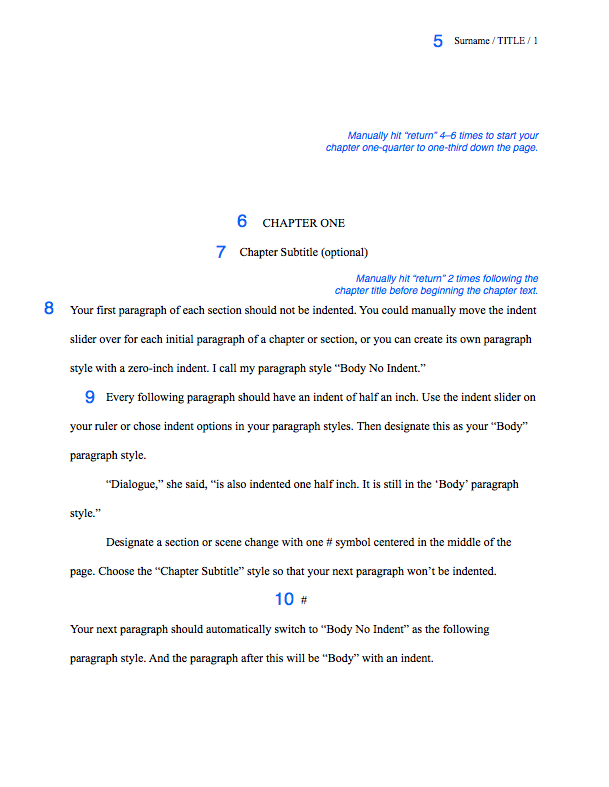
6. Manually hit “return” 4–6 times to start your chapter one-quarter to one-third down the page.
Paragraph Style: “Chapter Title”—12 pt. TNR, center alignment, all-caps, no indent, following paragraph style: “Chapter Subtitle” (if using), otherwise “Body No Indent”
7. If you have a chapter subtitle, put it on the next line down.
Paragraph Style: “Chapter Subtitle”—12 pt. TNR, center alignment, Title Capitalization, no indent, following paragraph style: “Body No Indent”
8. Manually hit return 2 times before beginning your first paragraph. Do not include drop-caps or decorative initials.
Paragraph Style: “Body No Indent”—12 pt. TNR, left alignment, no indent, following paragraph style: Body (default)
9. Each subsequent paragraph should have a half-inch first line indent using the ruler, not a tab key. Highlight this indented paragraph, right-click on the default “Body” paragraph style, and select “Redefine style from selection.” Note that if anything else had been set as Body before now, its style will change.
Paragraph Style: “Body” (default)—12 pt. TNR, left alignment, 0.5″ indent
Use the indent formatting set to 0.5″. DO NOT USE THE TAB KEY or type five sentences to indent your first line. If you have done this, set your paragraphs to indent automatically. Then find/replace all tabs by typing “^t” into “find” and leaving “replace” blank. You’ll do the same with double spaces after each sentence.
Unless you are typing on a manual typewriter, indents should come from formatting, not the tab key or the space bar.
Unless you are typing in a monospace or typewriter font like Courier, do not hit space twice after each sentence.
10. Separate scene changes with a hash (#) or three asterisks (***), centered, in either of the Chapter title/subtitle styles, whichever one has the following paragraph style set as “Body No Indent.”
11. (not pictured) For long quotes, excerpts, or letters: Indent one inch on both the left and the right side for long quotes. These can be single or double-spaced. Either way, they need an extra line break both above and below, to set them apart from the rest of the body. They can also be italicized. Personally, I’d italicize only if the text were a “letter” from one character to another.
Paragraph Style: “Long Quote”—12 pt. TNR, left alignment, right indent 0.5″, left indent 0.5”
Dear Reader,
This is a letter or lengthy handwritten note (longer than a few words). Indent 1/2 inch on both sides (I prefer 1 inch). Short handwritten notes can be formatted like signs, below.
Don’t put these in different fonts. Let your designer choose typefaces.
For signs or short handwritten notes: Include an extra line break before and after, and center the text without an indent.
FOR SALE: apples
Come ‘n get ’em!
For text, instant, or direct messages: Indent a half inch on both sides using the ruler settings. For a dialogue or back-and-forth messages, I like to right-justify the POV character and left-justify anyone else. How you designate the characters’ identities is up to you. Note: In verse novels, authors will often continue the main character’s voice on the left and other character’s words will be on the right.
Friend: Hey.
Me: Hi.
Here’s a long message that
we’ll add line breaks to so
it looks more like a text.
Yeah. I think my phone only
allows like 32 characters per
line or whatever. But 6ish words
is about right, too. Really you
can add line breaks wherever,
like poetry.
I created a new message here
by hitting “enter” like usual.
Enter line breaks by holding
shift while you press “return.”
You’re adding a line break, not
a new paragraph.
If you’re typesetting an actual
book and not submitting a MS,
then I still recommend right-
justifying single-line texts,
like the “Hi” above, but…
For longer text messages, left-
justify and indent 4 or 5 inches. That way you avoid awkward short lines on the right side of the page, like the “like poetry” above.
You don’t have to add line breaks if you indent this far, but you might want to just in case someone accidentally removes
all indents.
Otherwise your text messages will just look like normal text again. Pro tip: write the message and edit it before figuring out formatting, otherwise you’ll be spending too much time prematurely adding and removing line breaks.
Miscellaneous
DO NOT add two spaces after a period unless you’re submitting in a monospaced font like Courier (which you shouldn’t; see above)
DO NOT hit the return or enter key after each line of prose. On a computer, the words will wrap automatically. For poetry or verse, then yes, you can manually add line returns.
DO insert a page break after each chapter.
DO NOT use the “tab” key or type five sentences to indent paragraphs (see #9)
DO NOT add an extra space between paragraphs when double-spaced (see #9)
DO add an extra [vertical] space between paragraphs when single-spaced (e.g., the query email). Hit the return key twice.
DO NOT use bold or underlining for emphasis, unless typing in Courier. Only use italics, and use sparingly. If you paste into an email, check to make sure the italic formatting transferred over.
DO NOT include epigraphs, song lyrics, or poetry set apart before the first chapter. Agents want to read your words, not someone else’s. You can discuss epigraphs and the like when writing your dedication and acknowledgments. More info here.
Congratulations! As a reward for reading the miscellany, go here to download my free template for the MS standard format.
Keeping Punctuation Consistent
Inconsistent punctuation isn’t going to be a deal-breaker, but if you want to ensure that your punctuation is consistent (specifically your ellipses, dashes, and quotation marks), read Part 2: Hard-core Manuscript Formatting.
Receiving an Offer of Representation
Read “When an Agent Requests your Manuscript” by Susan Dennard (now a NYT bestselling author!) at Let the Words Flow for advice on what to do when an agent offers you representation, especially if you still have pages being reviewed by other agents.
Did you find this information useful?
Subscribe to my blog! Writing courses and editing services are on hiatus while I complete my MFA.


 Lara Willard