Guide to SFF (Science Fiction and Fantasy) Sub-genres

Lara Willard answers genre questions: What's Magical Realism? What's the difference between Science-Fiction and Fantasy? What genre is my novel?

Find out the closest fitting sub-genre for your speculative fiction, or troubleshoot your genre in this guide for writers.

Contents

  1. Major Genres
  2. SFF Sub-genres Used in #SFFpit
  3. The Difference between Science Fiction and Fantasy
  4. What’s the Difference between…
  5. Setting-Based Sub-genres
  6. Literary Fantasy
  7. Fantasy Romance or Romance Fantasy (Order Matters!)

Major Genres

This post is about the sub-genres of science fiction and fantasy. If you don’t think your story falls into speculative fiction, see my post on commercial, literary, and “general fiction” categorization, or watch my seminar on understanding age categories and genres (>1 hr).

SFF Sub-genres Used in #SFFpit

If you are writing speculative fiction and plan on pitching via #SFFpit, or if you are researching #MSWL, you need to know your sub-genres. The total list, as of December 2014, is below. I’ve divided them based on the requirements of the sub-genre.

This list is what what used for #SFFpit in 2014. For current lists or other contests, please visit the contest host’s website or blog.

By Subject (Genre Depends on Specific Tropes)

  • #FA – fantasy
  • #DF – dark fantasy
  • #EF – epic or high fantasy
  • #MYF – mythic fantasy
  • #PN – paranormal
  • #SF – science fiction
  • #DS – dystopian
  • #ML – military science fiction
  • #PA – post-apocalyptic SF
  • #SP – steampunk

By Setting (Genre Depends on Time or Place)

  • #CF – contemporary fantasy
  • #HF – historical fantasy
  • #SO – space opera
  • #TT – time travel
  • #UF – urban fantasy
  • #WW – weird west

Crossovers

  • #FR – fantasy romance
  • #HF – historical fantasy
  • #AH – alternate history
  • #LF – literary fantasy
  • #MR – magical realism
  • #SFR – sci-fi romance
  • #SFT – sci-fi thriller
  • #SO – space opera
  • #TT – time travel

The Difference between Science Fiction and Fantasy

If the not-in-our-reality elements stem from technology, it’s Science Fiction. If they stem from magic or unknown forces, it’s Fantasy. There is crossover. The Force in Star Wars tied the series to fantasy until the Midi-chlorians debacle of the prequels, which tried to sever any ties with the fantasy genre by explaining the Force with science.

The umbrella term for Science Fiction and Fantasy is Speculative Fiction, which is fiction not limited by real-world settings or physics.

What’s the Difference between…

Contemporary Fantasy & Urban Fantasy?

Answer:  If the urban setting is so experiential that it becomes a living, breathing thing, then it’s Urban Fantasy. You could have a historical UF set in 1930s NYC or a futuristic UF. Contemporary Fantasy is contemporary. Internet age. The fraternal twin of urban fantasy is rural fantasy, but “rural fantasy” is better categorized by its setting in time, not place.

Contemporary = Internet age.

Historical = set in the past.

Contemporary Fantasy & Magical Realism?

In Magical Realism (#MR), the fantastic elements aren’t described as extraordinary. “It is what it is.” Examples of #MR would be One Hundred Years of Solitude, The Curious Case of Benjamin Button, and the film Big Fish. The setting is the “real world.” The difference between magical realism (#MR) and contemporary fantasy (#CF) is that CF treats the fantastic as being weird or extraordinary. It explains the magic or calls it magic (or something similar). Disney loves contemporary fantasy. It’s always calling stuff magic.

In a Magical Realism world, magic is real and ordinary. When something falls at a party, we don’t explain gravity to the whole room. It’s just a part of our reality. We accept it.

Genres with Gods and Goddesses—Paranormal, Mythic, Dark, or…?

These can have some overlap.

If the gods are based off classical or pre-established mythology, it’s a mythical fantasy. If they are interacting with the real world, it’s paranormal (specifically supernatural). If it’s set in an imaginary world (Narnia, Middle Earth, Westeros), then I’d just call it fantasy (#FA). If the tone is dark or evil, it would be dark fantasy.

High Fantasy & Space Opera?

They are quite similar. Epic/High fantasy entails a journey, often with a “fellowship.” Think Lord of the Rings, swords & sorcery. An epic fantasy is epic in characters, in setting, and in scope. Journeys span countries, take time. Space Opera is an epic tale, like epic or high fantasy, except the travel is between worlds, and the travel is usually done via space ship. Space Opera, if it contains spaceships, is Science Fiction. The setting is the main difference.

Post-Apocalyptic or Dystopian?

dystopian novel is about a protagonist in a futuristic setting fighting a corrupt state.

If your “dystopian” lacks technology as part of the setting or corruption, it’s probably epic fantasy. It’s the difference between Big Brother (dystopian) and Dark Lord (epic fantasy).

post-apocalyptic novel is about human survival. The story takes place after some major disaster has affected the world. Usually the disaster is a natural disaster (think Day After Tomorrow and other world-disaster movies), a zombie apocalypse (Warm Bodies, World War Z), World War III, an alien or monster invasion (The Book of Eli), or a disease outbreak (Contagion, Station Eleven). A post-apocalyptic novel may also be science-fiction thriller. Warm Bodies crosses over into paranormal romance. Station Eleven is often considered literary fiction.

Post-apocalyptic = after civilization—humanity vs natural disaster, invasion, or aftermath

Dystopian = against uncivilization—humans vs a corrupt State

PA and DS novels have an interesting cause-and-effect relationship. Take current day, add an apocalypse, have people survive, they end up creating a new government which becomes corrupt. That’s the beginning of The Hunger Games. Take a corrupt government, overthrow it in a major war, and you’ve got people trying to rebuild and survive. That’s Mockingjay.

Dark or Paranormal Fantasy?

To be grievously simplistic, paranormal means “monsters.” If your novel contains ghosts, vampires, were-animals, zombies, Big Foot, or any kind of “spooky” type of creature, it’s paranormal. Paranormal can be romance, adventure, or comedy. Generally it is placed under fantasy, but it could be post-apocalyptic (see Warm Bodies, above). If it’s a romance novel with a paranormal love interest, it’s paranormal romance.

dark fantasy has a dark, ominous tone. It might concern death or criminal behavior. Usually a dark fantasy is considered a fantasy / horror crossover.

Not all paranormal fiction is dark. Twilight isn’t a horror novel, it’s a romance. Shaun of the Dead is more of a comedy adventure than a horror movie. I’d probably call it paranormal comedy. If it weren’t funny, but not particularly dark or ominous, just a paranormal adventure, I’d call it paranormal fantasy.

Setting-Based Sub-genres

If your novel prominently features historical settings or characters, it’s Historical Fantasy, Alternate History, or Time Travel.

  • Historical Fantasy (#HF) is set in the past but contains fantastic elements. It’s the fraternal twin of contemporary fantasy.
  • Alternate History #AH asks “What would happen if [historical event] had a different outcome?” While HF focuses on the past, AH focuses on a new present or future.
  • Time travel is either Science Fiction (if it uses tech or science to travel through time), or it’s a portal fantasy (if it uses a magic portal to travel through time).

If your novel primarily features the geography or heavens of a fantasy world (like Narnia, Middle Earth, Westeros, or Mount Olympus), it’s fantasy or one of its subgenres.

If your novel takes place in outer space or has interplanetary settings (it goes from one planet to the other), then it’s more likely science fiction.

The other setting-based genres, as sorted in the list above, should be pretty straightforward.

Literary Fantasy

Literary Fantasy #LF is a new addition to the #SFFpit hashtags. In LF, more emphasis is placed on theme, the human condition, or the prose. If book stores wouldn’t know whether to shelve you with SFF or with “Fiction” (aka General Fiction aka Literature), you may have written LF. Recent examples of Literary Fantasy—The Ocean at the End of the Lane (also Magical Realism), Jonathan Strange and Mr. Norrell (Historical Fantasy), The Magicians.

Genre isn’t about labels, it’s about finding readers. SFF readers look for imagination and adventure that isn’t 100% ground in reality. Literary readers want excellent prose, or to be emotionally or mentally invested in a character or theme. Of course there’s crossover!

For more about the “literary” classification, read my post Literary? Mainstream? Commercial? What Genre Is This Anyway?

Fantasy Romance or Romance Fantasy (Order Matters!)

A Fantasy Romance is a Romance novel with fantastic elements. It takes more after the romance genre than the fantasy genre. That means the novel is primarily about getting two love interests into a relationship.

It’s like the difference between yellow-orange and orange-yellow. Put an “ish” after the first word, and you can tell that yellow(ish) orange is more orange, and orange(ish) yellow is more yellow. If your novel couldn’t stand its own among other romance novels, it’s more likely a romantic fantasy.

Whenever you combine two genres together, the second one is the prominent genre, and the first is the modifying adjective. Which genre readers would be more likely to enjoy your book? That’s your prominent genre.

If you still aren’t sure about genre, leave a question below or tweet your question to @LaraEdits.

Appendix: Am I a reputable resource on this subject?

Well, I think so. I’m a published literature essayist of Sigma Tau Delta, the International English Society. I graduated summa cum laude with an interdisciplinary degree in literature, writing, and English (among other things). Since then, I’ve traded in my academic writing for a conversational tone. As a writing coach, freelance editor, and writer, I have experience in the field and have been reading on the subject of speculative fiction genres for years. I’ve taken into account the opinions of literary agents, librarians, publishers, and readers. Collaborative opinions aren’t something you can cite easily, so don’t look for a works cited page or list of references here. If you’re writing a literature paper on the subject of sub-genres, you can cite me using the following information, based on your style guide: C. Lara Willard / “Guide to SFF (Science Fiction and Fantasy) Sub-genres” / Write Edit Repeat / [link to this post].

Update: Connor Goldsmith, literary agent at Fuse Literary, has shared his definitions on sub-genres, with a section devoted to horror, here.

Manuscript Format Template (free download)

 MS-format

Have you read my posts on Formatting your Novel Manuscript? If not, read part one here and part two here.

I surveyed forty literary agents in October of 2014 to ask them which font they preferred for submitted manuscripts. The clear winner was Times New Roman. Many agents read pages on e-readers or mobile devices, and TNR is a web-safe, system-installed, serif.  Using TNR allows them to read pages without changing formatting first, but it is also an easy font to change.

Download the MS Format TEMPLATE.

Right-click the link above and “save as.” I saved it as a Word Document, even though I personally use Pages, so if there are any issues, please report them to me! Our PC isn’t working, and I don’t have Word on my Macbook Pro.

This template uses paragraph styles, which you can import into any preexisting document. Otherwise save a copy of MS Format TEMPLATE, rename it, and begin typing or pasting your manuscript.

Read through all of the instructions on the template, and save it as-is to keep as a reference. Do not type into the original TEMPLATE—type in a duplicate or copy file.

Copyright Notice:

This template was created by me for personal or educational use only. You may share it with others—simply give them this link or share the link on social media using the buttons below. You may not pass this template off as your own or charge anyone to use it. You may not upload the template to any website or blog.

Of course, you have full ownership of your own manuscript, whether you use my template or paragraph styles to format it.

Hard-Core Manuscript Formatting

Or, Making your Typesetter Love You.

This is Part Two on my series of MS Formatting. For the basics of MS formatting, read Part One here. Get a template here in Part Three.

Remove all double spaces.

First, find and replace all double spaces with single spaces. Each period should be followed by ONE, not two, spaces.

Then do the exact same find and replace (just hit the “Replace all” button again) in case you had any rogue triple spaces lurking around.

Be consistent with your punctuation

These are the steps I go through to make sure all the punctuation is consistent. You really only have to do all of the following if you’re a typesetter, are perfectionist or anal retentive, or are trying to woo your publisher’s typesetter.

Publishers have their own style guides, but at least in terms of punctuation, it looks like American Publishers model their styles after the Chicago Manual of Style.

I recommend using the “Easiest Options” below while drafting your manuscript, and then doing a find/replace while revising and rewriting.

Ellipses (…)

  • Easiest option: three periods without spaces (d…b)*
  • Word’s auto-formatting: an ellipsis special character (d…b)*
  • AP style: three periods with a space before and after (d … b)
  • The Chicago Manual of Style‘s preferred option: three periods with five spaces (d . . . b)

*If you do either of these options, get in the habit
of typing a space before and after (
d … b).

The problem with CMOS’s favorite is that those internal spaces need to be non-breaking spaces, otherwise if the ellipsis falls at the end of the line, it might look like this .
. .

. . . which is really horrible typography. If you’re typesetting an actual book, do not use the ellipsis special character. Use periods with non-breaking spaces. (In Word: [Option][Space], on PC: [Ctrl][Shift][Spacebar], in Adobe: [Command][Option][X] for Mac or [Ctrl][Alt][X] for PC).

If you’re submitting a manuscript, it doesn’t really matter what you do (three periods, three spaced periods, or the ellipsis special character) as long as you are consistent and use a space before and after the ellipses.

However . . . when ellipses are used with quotation marks, you delete the space between the ellipsis and the quotation mark:

“Trailing off . . .” not “Trailing off . . . “

“. . . continuing.” not ” . . . continuing.”

Again, whatever method you use for ellipses, be sure you are consistent. Even if you use the auto-formatting that switches periods to the ellipsis special character, some triple-periods might still be hiding somewhere.

Em-dashes

I have a Quick and Easy Guide to Dashes if you need a primer on the differences between hyphens, em-dashes, and en-dashes and when to use them. Note that in monospaced typefaces like Courier, all dashes have the same width. An em-dash will be indistinguishable from a hyphen. I recommend using two hyphens if you will be editing or revising in Courier.

  • Easiest option: two hyphens without spaces (d–b)
  • Word’s (inconsistent) auto-formatting: an actual em-dash, with no spaces (d—b)
  • AP style: an em-dash surrounded by spaces (d — b)
  • Poorly advised attempt at making AP style prettier: an en-dash surrounded by spaces (d – b)
  • The Chicago Manual of Style’s preferred option: either two hyphens or one em-dash, no spaces. Be consistent!

Changing inch marks ″ to smart quotes “”

Say you use an online program (or app) for drafting, but you revise in a desktop program like Word. Sometimes switching between text editors really screws with your paragraph breaks and quotation marks. Quotation marks should be curved, like micro sixes and nines (“”, zoomed in: 66 99) not straight lines, which are actually inch marks (″, zoomed in: ||  ||).

If you’ve only used one word processor for the duration of your draft, your quotation marks should be consistent. You can turn on auto-format by following these instructions.

If you already have all the quotation marks typed, find/replace all automatically by typing ” into both the find and replace boxes and selecting “Use wild cards” before hitting “replace all.” Some might format awkwardly, so be sure to have a proofreader look for wacky smart quotes or replace each one at a time.

Repeat for foot marks ‘ and prime ′ to turn them into apostrophes ’ or single quotes ‛ and ’

If you cannot fix the quotation marks automatically, then you’ll have to do several Find/Replace searches. But first you need to search for all soft returns / line breaks / carriage returns (see below) in your document and replace them with paragraph breaks.

Once you are sure all of your paragraph breaks are consistent, follow the F/R searches below to manually fix all of your quotation marks:

  1. Find: [space][“] Replace: [space][left curly quote “]
  2. Find: [paragraph break*][“] Replace: [paragraph break][right curly quote ”]
  3. Find: [“][paragraph break] Replace: [left curly quote “][paragraph break]
  4. Find: [“][space] Replace: [right curly quote”][space]

Repeat for double prime ″ and foot marks ‘ and prime ′

*see below for codes

Awkward invisibles

Sometimes if we use different word processing programs while typing, the programs will use a line break instead of a paragraph break. Line breaks are also called carriage returns or soft returns.

For consistency, change them all to a paragraph breaks.

In Word, here are the codes you’d enter into the find/replace boxes:

  • Find line breaks: ^l or ^11
  • Replace with a paragraph break: ^p

In Open Office, the code for a paragraph break is [/n]. In Pages, select the invisibles from the drop down menu.


MS-format

Formatting your Novel Manuscript

How do I format a manuscript? | Novel Formatting from Editor Lara Willard

Contents

Choosing a Font
Emailing Requested Pages
Formatting your Manuscript
Keeping Punctuation Consistent
Receiving an Offer of Representation

Choosing a Font

The choice of font for your manuscript is one that’s been made for you. You need to use 12 pt. Times New Roman, double-spaced.

The size 12 font and double spacing is non-negotiable. The typeface is. Still, after asking dozens of literary agents about their preferences, I urge you to choose Times New Roman.

Why TNR?

Personally, as a typesetter, reader, and graphic designer, I loathe Times New Roman. But here’s why you should use Times New Roman for standard manuscript formatting:

  1. I polled 20 agents, and all of them accept TNR. Not so with other fonts.
  2. It’s standard. It’s been the standard since TNR was the default typeface installed on home computers.
  3. It’s a serif font. Publishers prefer serif fonts, and that preference has carried over to literary agents. It’s what we associate with books.
  4. It’s available on any device or browser. There are only two serif typefaces available on any browser or device: Times New Roman and Georgia. If you use any other font, there’s a definite chance that your recipient’s device won’t have the font and will switch it to TNR. You might think “Well, that’s fine. It switches for them.” But every time I get a manuscript in Cambria (the current default typeface for Word), I get a little pop-up that says “An Error Occurred” that I have to acknowledge and close. Yes, most agents will have Cambria on their computers, but Mac users might not, and it’s still not considered a web-safe font.
  5. TNR is very easy to read or change on e-reading devices. Many agents now read requested partials and fulls on Kindles or tablets. Times New Roman is easily changed into the typeface and size of their preference.

Courier has been a standard since the days of snail-mail manuscript mailing because, as a monospaced font, it yields approximately the same number of words per page. It has serifs (though it’s technically a slab serif), and it’s available on any device or browser. I prefer Courier while editing because it gives the most white space. My eyes are used to it, and it feels natural. I also know that I’m in “editing mode” whenever I’m reading Courier. However, some agents passionately hate Courier. They aren’t going to reject you because of your font, but they will switch it to something else, likely Times. Courier is also not easy to read on e-readers.

Bottom line:

Write in whatever font you darn well please. You could type in Webdings if it will help you from revising while getting out your first draft. Revise in something legible: a serif, a monospaced slab (like Courier), even a sans-serif (like Arial). Before you submit to agents, revise one last time in a typeface from a different family—you’ll be surprised how many things you catch when the words aren’t always in the same position on the page! Submit to agents using 12 pt TNR, double-spaced, unless they’ve stated differently in their agency guidelines.

Pasting Pages in the Body of the Email

Word uses a bunch of formatting that doesn’t always translate to web use, like italics, non-breaking spaces, space after paragraphs, double-spaced lines, and centered text. It’s always a good idea to strip the formatting for blog posts or emails, either by putting it into a text-only program like Notepad or TextEdit or by choosing “use destination formatting” while pasting. I hold down shift while pasting: shift+control+V

My pages will have a consistent look with my query letter, rather than be in a different font or format. Then I make sure there are spaces between my paragraphs, so it doesn’t look like one huge blob of text.

I’ve received pasted pages that weren’t stripped of formatting. Sometimes the spaces between words are gone. Sometimes the text is in one single horizontal line that scrolls on to the right, forever. Sometimes the query is gigantic or microscopic in comparison to the pages. Make it easy on the agent to read your pages. Don’t give him or her an easy way to say no.

Emailing Requested Pages

Subject Line

If you are emailing requested pages to an agent—that is, an agent asked you to send him or her pages after you queried—your subject line should be obvious that you are replying with requested materials.

A subject of Partial Request: BOOK TITLE Age Category Genre is a good starting point.

I’d reply to the email that they sent. An agent might mark your initial query email as important, reply directly to that (re: Query: CYCLES MG Fantasy) with a request for pages, and then if you reply to their email (re: Query: CYCLES MG Fantasy), your new email, because it’s part of the same thread, will also be marked as important.

However, if you’re replying to something they rejected, then your reply will also be marked as rejected. Resist the urge to send a “thank you” or “what about this other manuscript?” reply. If rejected, you can query with another manuscript in 6+ months. If you got a revise and resubmit, resubmit in 6+ weeks.

Content

Be professional, polite, and concise.

Dear Mr. Agent,

I am delighted to send you these pages you requested. Below I have included my initial query letter.

I look forward to hearing back from you.

Sincerely,

Your Name

[Initial query letter—the same one sent to this specific agent—pasted without formatting]

Make sure you are following agency guidelines. Don’t attach pages if they want them pasted in the body of the email. If they request your query or a synopsis as separate files, follow their instructions!

Naming your Document

When sending a partial or full request to an agent, name your document Surname_TITLE_Partial or Surname_TITLE_Full (including the .doc extension). That way, if an agent saves your document to her computer or e-reader, she will immediately know 1) what and whose it is before she opens it, 2) the query that got her interested, and 3) where to send her response if she lost your initial e-mail.

Formatting your Manuscript

Start out with 1-inch margins all around and left (not justified) alignment.

Page i—The Query Letter

Paragraph Style: “Title Page”—12 pt TNR, single-spaced, no indent

Because many agents read requested pages on e-readers, they may have forgotten your query when they start reading your pages. I recommend including your query in the body of the email (see above) as well as before the title page of your requested pages.

Use 12 pt. Times New Roman, single-spaced with an extra space between paragraphs (like your email query). Make sure you are sending the same query you sent the agent originally. Don’t send a partial to Ms. Sally Agent with a query to Mr. Hans Agent, listing the specific reasons why you want him as your agent!

Then insert a page break.

How to Format your Novel Manuscript and Query Letter

Page ii—The Title Page

This page should be in the same paragraph style, with no headers.

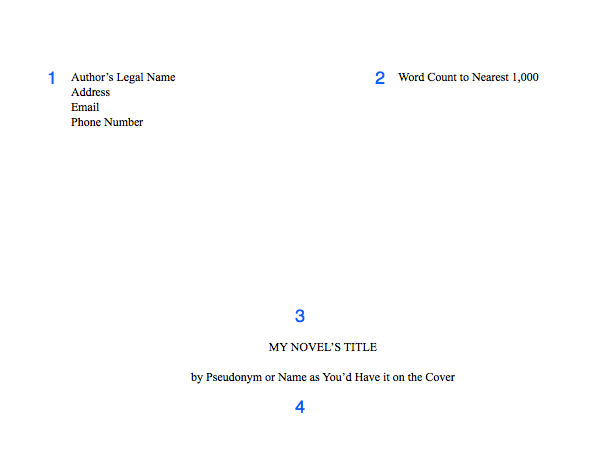
1. Include your contact information, especially your email and a reliable phone number. Agents offer representation over the phone! But they will email you to let you know if they’d like to call you, so you can schedule a time.

2. After you type your name, add a tab stop with a right alignment to your ruler on the right margin. Then enter your word count, rounded to the nearest 1,000. If text keeps dropping to the next line, make the tab option a decimal alignment.

3. Halfway down the page, include your title in all-caps. Keep it in 12 pt. font, and do not bold, italicize, or underline it.

4. Two lines down (or one line, if you double-space this part), include your name as you’d like it to appear on your cover. Note that if your legal name is Steven King, you will probably need a pseudonym to avoid confusion with the famous SK.

Then insert a section break.

How to Format your Novel Manuscript and Query Letter

Your Manuscript

Page one of your manuscript and following pages will have the same formatting.

Be sure to include your header in the header section, not in the body of the page.

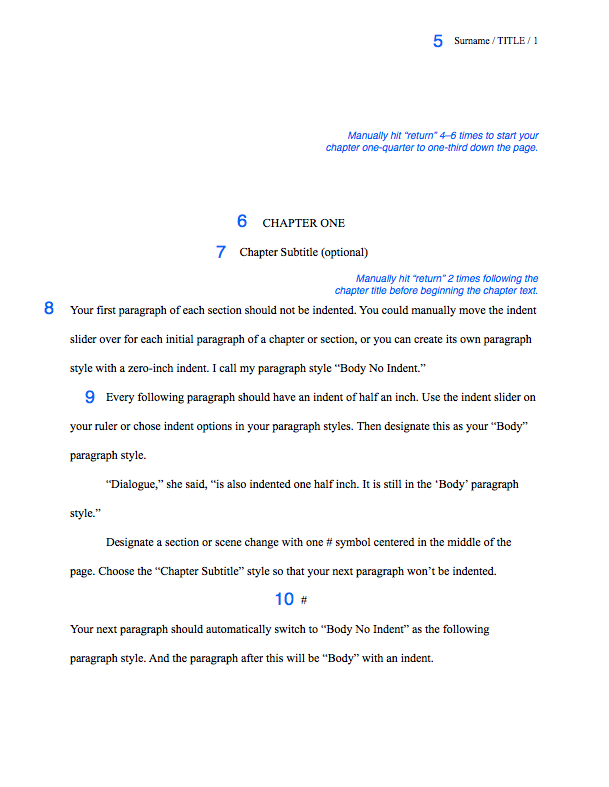
5. Headers should include your surname (whichever surname you have been using in your correspondence with the agent), an abbreviation of your title (if it’s longer than 3 words), and the page number (insert the page number). The page number will automatically show as 2 or 3. In your section settings, change the page numbering to start at 1. Learn how for Word. In Pages, in your inspector window, chose Layout > Section > Start at 1.

I prefer headers to be aligned on the right side so my eyes don’t have to skip over them every time I scroll down or flip to the next page.

Paragraph Style: “Header”—10 or 12 pt. TNR, right aligned

How to Format your Novel Manuscript and Query Letter

6. Manually hit “return” 4–6 times to start your chapter one-quarter to one-third down the page.

Paragraph Style: “Chapter Title”—12 pt. TNR, center alignment, all-caps, no indent, following paragraph style: “Chapter Subtitle” (if using), otherwise “Body No Indent”

7. If you have a chapter subtitle, put it on the next line down.

Paragraph Style: “Chapter Subtitle”—12 pt. TNR, center alignment, Title Capitalization, no indent, following paragraph style: “Body No Indent” 

8. Manually hit return 2 times before beginning your first paragraph. Do not include drop-caps or decorative initials.

Paragraph Style: “Body No Indent”—12 pt. TNR, left alignment, no indent, following paragraph style: Body (default)

9. Each subsequent paragraph should have a half-inch first line indent using the ruler, not a tab key. Highlight this indented paragraph, right-click on the default “Body” paragraph style, and select “Redefine style from selection.” Note that if anything else had been set as Body before now, its style will change.

Paragraph Style: “Body” (default)—12 pt. TNR, left alignment, 0.5″  indent

Use the indent formatting set to 0.5″. DO NOT USE THE TAB KEY or type five sentences to indent your first line. If you have done this, set your paragraphs to indent automatically. Then find/replace all tabs by typing “^t” into “find” and leaving “replace” blank. You’ll do the same with double spaces after each sentence.

Unless you are typing on a manual typewriter, indents should come from formatting, not the tab key or the space bar.

Unless you are typing in a monospace or typewriter font like Courier, do not hit space twice after each sentence.

10. Separate scene changes with a hash (#) or three asterisks (***), centered, in either of the Chapter title/subtitle styles, whichever one has the following paragraph style set as “Body No Indent.”

11. (not pictured) For long quotes, excerpts, or letters: Indent one inch on both the left and the right side for long quotes. These can be single or double-spaced. Either way, they need an extra line break both above and below, to set them apart from the rest of the body. They can also be italicized. Personally, I’d italicize only if the text were a “letter” from one character to another.

Paragraph Style: “Long Quote”—12 pt. TNR, left alignment, right indent 0.5″, left indent 0.5”

Dear Reader,

This is a letter or lengthy handwritten note (longer than a few words). Indent 1/2 inch on both sides (I prefer 1 inch). Short handwritten notes can be formatted like signs, below.

Don’t put these in different fonts. Let your designer choose typefaces.

For signs or short handwritten notes: Include an extra line break before and after, and center the text without an indent.

FOR SALE: apples
Come ‘n get ’em!

For text, instant, or direct messages: Indent a half inch on both sides using the ruler settings. For a dialogue or back-and-forth messages, I like to right-justify the POV character and left-justify anyone else. How you designate the characters’ identities is up to you. Note: In verse novels, authors will often continue the main character’s voice on the left and other character’s words will be on the right.

Friend: Hey.

Me: Hi.

Here’s a long message that
we’ll add line breaks to so
it looks more like a text.

Yeah. I think my phone only
allows like 32 characters per
line or whatever. But 6ish words
is about right, too. Really you
can add line breaks wherever,
like poetry.

I created a new message here
by hitting “enter” like usual.
Enter line breaks by holding
shift while you press “return.”
You’re adding a line break, not
a new paragraph.

If you’re typesetting an actual
book and not submitting a MS,
then I still recommend right-
justifying single-line texts,
like the “Hi” above, but…

For longer text messages, left-
justify and indent 4 or 5 inches. That way you avoid awkward short lines on the right side of the page, like the “like poetry” above.

You don’t have to add line breaks if you indent this far, but you might want to just in case someone accidentally removes
all indents.

Otherwise your text messages will just look like normal text again. Pro tip: write the message and edit it before figuring out formatting, otherwise you’ll be spending too much time prematurely adding and removing line breaks.

Miscellaneous

DO NOT add two spaces after a period unless you’re submitting in a monospaced font like Courier (which you shouldn’t; see above)

DO NOT hit the return or enter key after each line of prose. On a computer, the words will wrap automatically. For poetry or verse, then yes, you can manually add line returns.

DO insert a page break after each chapter.

DO NOT use the “tab” key or type five sentences to indent paragraphs (see #9)

DO NOT add an extra space between paragraphs when double-spaced (see #9)

DO add an extra [vertical] space between paragraphs when single-spaced (e.g., the query email). Hit the return key twice.

DO NOT use bold or underlining for emphasis, unless typing in Courier. Only use italics, and use sparingly. If you paste into an email, check to make sure the italic formatting transferred over.

DO NOT include epigraphs, song lyrics, or poetry set apart before the first chapter. Agents want to read your words, not someone else’s. You can discuss epigraphs and the like when writing your dedication and acknowledgments. More info here.

Congratulations! As a reward for reading the miscellany, go here to download my free template for the MS standard format.

Keeping Punctuation Consistent

Inconsistent punctuation isn’t going to be a deal-breaker, but if you want to ensure that your punctuation is consistent (specifically your ellipses, dashes, and quotation marks), read Part 2: Hard-core Manuscript Formatting.

Receiving an Offer of Representation

Read “When an Agent Requests your Manuscript”  by Susan Dennard (now a NYT bestselling author!) at Let the Words Flow for advice on what to do when an agent offers you representation, especially if you still have pages being reviewed by other agents.

Did you find this information useful?

Subscribe to my blog! Writing courses and editing services are on hiatus while I complete my MFA.