Time Management (& Printable 2015-2016 Quarterly Calendar)

One of my goals for October is to get more organized and be better at time management. The problem with being a work-at-home mom is that I’m always working and I’m always a mom! I’m all for being holistic, but nobody should be working all the time!

I’ll start with my calendar management, and then I’ll share the app I use to schedule my days.

Calendar Management

I took a class at my university called Writing for Organizations, and during that, I was taught how to use Gantt Charts to map out projects. I’m a visual person, so I really enjoyed it. But I haven’t applied that chart since! I created a template in Excel so that I can start using it to plan out individual months.

gantt chart

Download the Excel Template

I also created a quarterly calendar, originally for our family so we could see the whole year at a glance, but then I decided it would work really well for planning out my projects, too. In fact, you could use highlighters to create Gantt Charts on your calendar.

FIND THE 2018 PRINTABLE QUARTERLY CALENDAR HERE


Day Management

First I downloaded a Pomodoro app. The Pomodoro Technique is to set a timer for 25 minutes, work that entire time, take a 5-minute break, and then repeat two more times. After three or four “pomodoros” you get a longer break.

I picked 30/30 because I liked the graphics and the ability to color code.
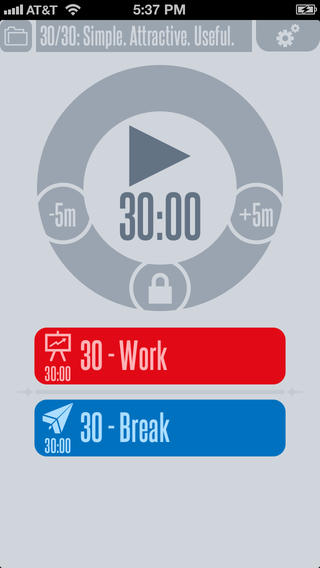
30-30

You can modify your ratios between work and break. I generally split the hours up this way: 40 minutes doing something I like (like editing). 5-minute break, 10 minutes doing something I dread (like answering emails or doing dishes), and another 5-minute break.

I also schedule in leisure time, food prep, and play time with my kids. Having the day mapped out with this app helps me to see that I DO have time for everything. 30/30 is especially recommended for people with ADD/ADHD.

Motivation

If you’re struggling with motivation, I recommend the Coach.Me app. You can also try Habitica for an RPG-inspired app.


What are your favorite methods for time management? Share in the comments.

Chekov Lists

Motivation

If you are not of a geeky persuasion and/or have no appreciation for popular culture, you probably won’t appreciate this. But if you know who Pavel Chekov is, then I hope you like and enjoy.

I made a series of geeky to-do / check-off lists for you. I call them…

wait for it…

the CHEKOV LIST. Continue reading

Character Profile Worksheets

These character packets will help you organize your characters’ traits in one central location.

Have you ever written a character who had short, lustrous hair in chapter one and frizzy ankle-length hair in chapter fifteen? Okay, maybe not. But perhaps your character had gray eyes in one chapter and green ones in another. Or maybe his or her last name changes halfway through the book.

Collect all of your information together with these worksheets in lieu of scraps of paper and sticky-notes all over your office, kitchen, computer, and sister’s house. Continue reading

Story Berg and Goal Boat: A Lesson in Backstory (and Goals)

This is Part Two in the Write, Edit, Repeat Character Series.

Backstory. What’s backstory?

Backstory is whatever happened to the characters before the story starts. It’s the stuff that the writer knows (or discovers), but what doesn’t show up in the story that the reader is reading.

Backstory is the reason we have Pottermore. Rowling had so much backstory that she could make an entire interactive experience for her readers out of it. An obsessive fan base and millions of dollars to create it doesn’t hurt.

Anyway, the most logical visual for backstory is an iceberg. All the stuff under water might be interesting, in fact, it might be really really good. But if it isn’t absolutely necessary to drive the story forward, then it doesn’t need to appear above water, in the finished piece. Continue reading